Skip to content
AS POS
Cloud POS · UAE & the Gulf

One POS for the counter, the kitchen, delivery - and every branch.

ASPOS takes the order at the till, sends each part of it to the station that cooks it, tracks delivery, and puts VAT-ready numbers in front of the owner. Arabic first. Built for the Gulf.

  • 5% VAT invoices
  • Arabic & English
  • Multi-branch from day one
KOT · GRILL#14095046
2 x Hamour Meal
-> BAR: 7 Up
1 x Alex Foul Plate
+ Foul Style: Alex
1 x Avocado Salad
-> SALAD
✓ Bar and Salad tickets printed separately
Per station
Each kitchen station gets its own ticket and its own screen - only its part of the order.
Real time
Placed at the till, on the kitchen display the same second. Ready at the station, gone from the board.
5% VAT
Compliant invoices, credit notes and reports for the UAE and the Gulf, out of the box.
Arabic first
Every screen, receipt and kitchen ticket in Arabic and English. AED and Gulf currencies.
The product

This is the real thing, not a mock-up.

Every screen below is ASPOS as it runs today. What the cashier sees, what the kitchen sees, and what the owner sees - from one order.

The till

Take the order in seconds, with every choice on it.

Meals with their drinks and sides, plates with their style, extras with their price. Walk-in, takeaway, delivery and dine-in on the same screen; cash, card, wallet and split payments.

  • ✓Combos and modifiers priced and printed correctly
  • ✓Open a shift, take cash, count the drawer
  • ✓Runs offline and syncs when the network is back
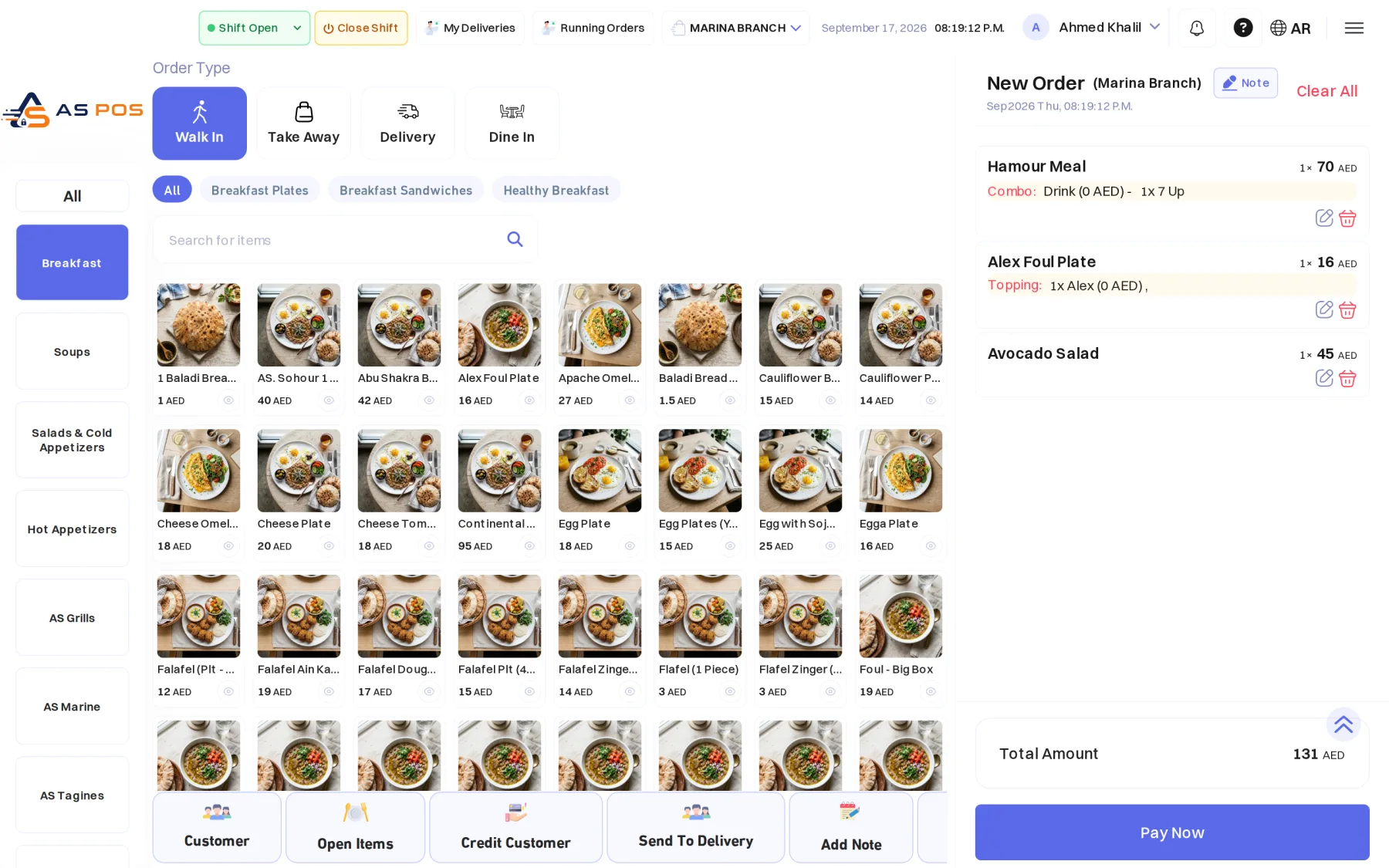
The ASPOS POS order screen with a three-line cart
The kitchen

The bar sees the drink. The grill sees the meal.

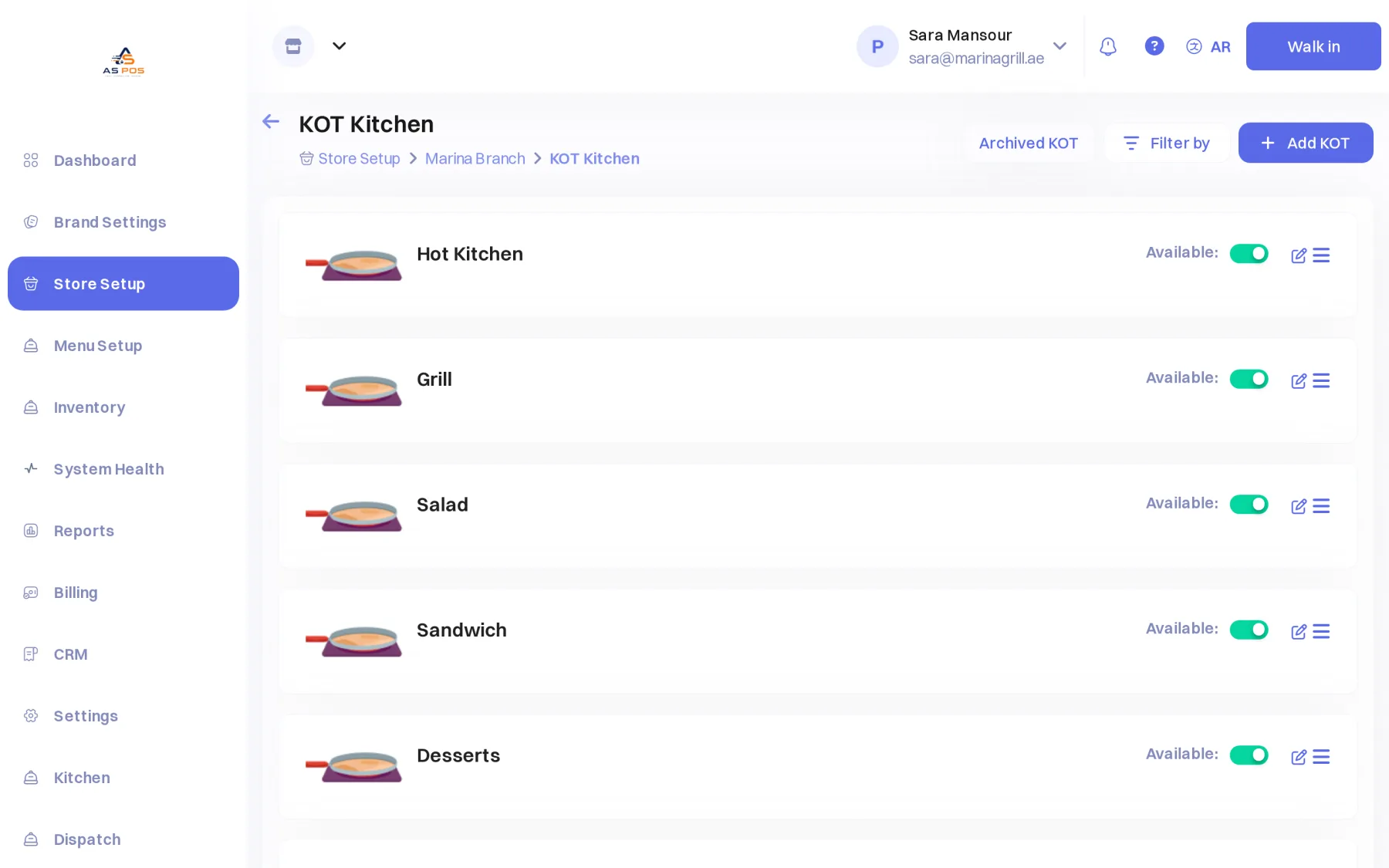
Set up your stations once - grill, bar, salad, desserts - and every order splits itself. Each station's screen shows only what it makes, and marks it ready when it is done. The dish is ready when every station that gates it says so.

  • ✓A kitchen ticket per station, never a duplicate
  • ✓Station screens with a Ready button per line
  • ✓Stations that do not hold the dish back (a bar, for example)
Running orders

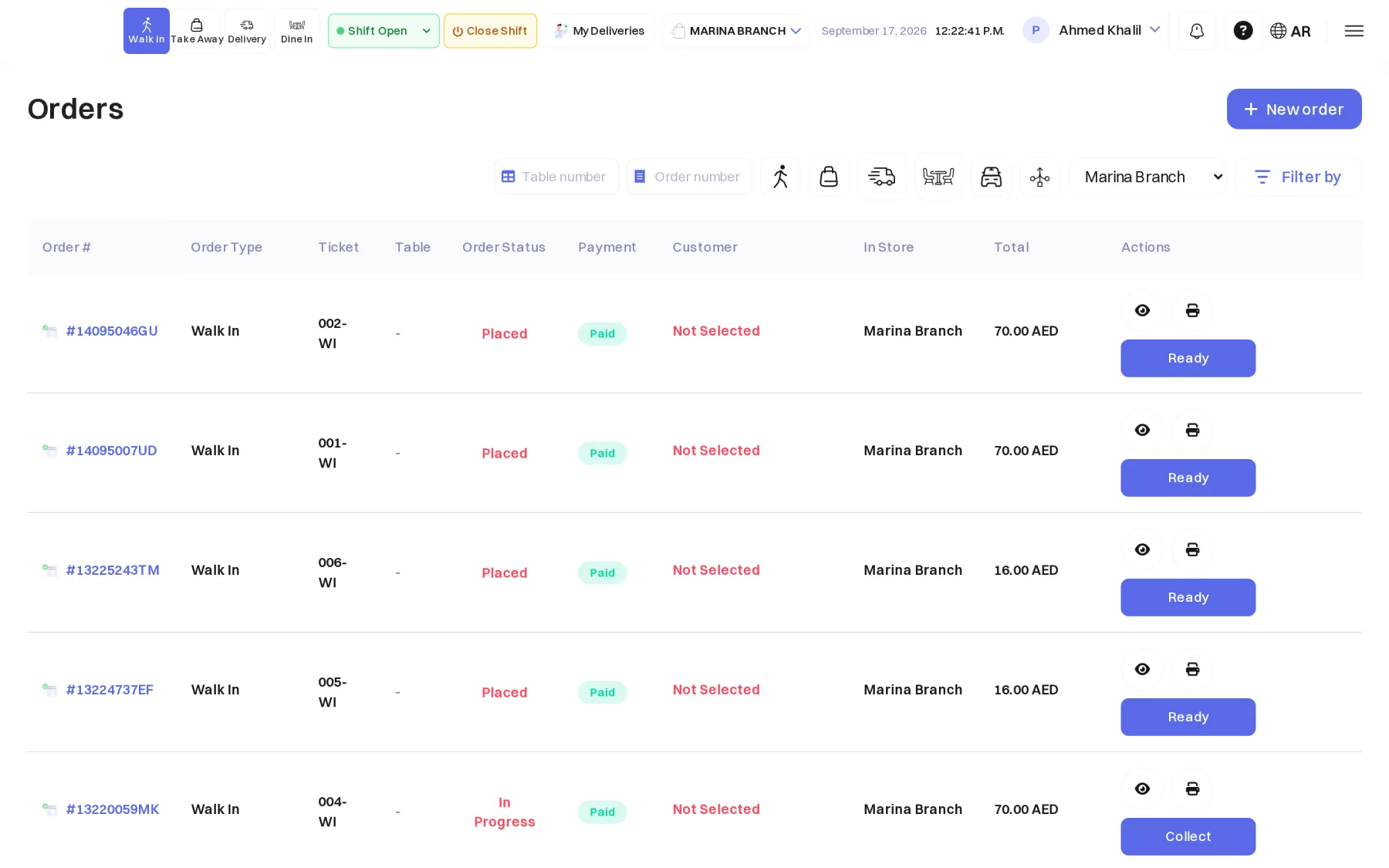
Every order, its status and its payment, at a glance.

The cashier follows placed, in-progress and ready orders across order types, prints again, marks ready, or sends to delivery - and the owner sees the same list from any branch.

  • ✓Paid, unpaid and awaiting online payment, clearly
  • ✓Reprint receipts and kitchen tickets
  • ✓Delivery assignment and driver settlement
The ASPOS running orders list with status, payment and Ready buttons
Back office

One place to set up every branch.

Menus, modifiers, prices per branch, kitchen stations and their printers, delivery zones by distance, roles and permissions, and the reports that tell you how the day went.

  • ✓Route products to stations by category in one click
  • ✓Delivery zones with fees and minimums by distance
  • ✓Daily business summary and scheduled reports by email
The ASPOS back office: the KOT kitchen stations of a branch - Hot Kitchen, Grill, Salad, Sandwich, Desserts
Everything included

What a restaurant brand needs to take an order and grow.

One platform across the counter, the kitchen, delivery and the back office. No modules to bolt on.

POS terminal

Fast cashier flow, split tenders, cash shifts and drawer counts. Works offline.

Kitchen stations

Tickets and display screens per station; each one gets only its part of the order.

Delivery & zones

Zones by distance with fees and minimums, driver assignment and settlement.

Customer ordering site

Every brand gets its own website for pickup and delivery, with wallet and loyalty.

Multi-branch

One brand, many branches: shared menu, per-branch prices and stations, one login.

VAT & credit notes

Compliant invoices, refunds and credit notes; reports that reconcile to the fils.

Loyalty & wallet

Points, stored value, gift cards and top-ups that customers can spend in store or online.

Roles & permissions

Cashiers, waiters, kitchen, dispatchers and managers see exactly what they should.

How it works

Live in days, not months.

A guided path from sign-up to your first order.

  1. 1

    Set up your brand

    Create your workspace, add your branches, import or build your menu with modifiers and prices, and name your kitchen stations.

  2. 2

    Train your team

    Cashiers, waiters and the kitchen learn the screens quickly. Roles keep everyone on their own part of the system.

  3. 3

    Start serving

    Take orders at the counter, in the kitchen and online, and watch the day's numbers come in from every branch.

Connects with the channels your customers use

Aggregator names are shown for reference. Integrations are added as they are certified.

Pricing

Simple plans, per branch.

Pick a plan and sign up online. Your workspace is created the moment payment clears.

  • ✓The POS terminal, the kitchen screens and the back office
  • ✓Your own customer ordering site
  • ✓Arabic and English on every screen and receipt
  • ✓VAT invoices, credit notes and daily reports

All plans include the POS terminal, the back office, and Arabic + English. Prices exclude VAT.

See ASPOS run your restaurant.

Book a demo and we will walk you through the till, the kitchen screens, the ordering site and the reports - on your own menu.

Contact

Let us build your demo.

Tell us about your restaurant and we will come back with a walkthrough on your own menu.